Quick Summary: The only official way to contact Roblox Support is through the web form at roblox.com/support. No phone number exists. No live chat. No email. This guide covers every ticket category, what to include per issue type, realistic response times, and how to follow up the right way.
Key Takeaways
- Only one official channel: roblox.com/support — web form only
- No phone number, no live chat, no email address
- Response times are 2–7 business days — this is normal, do not panic
- Never submit duplicate tickets — it sends you to the back of the queue
- Follow up by replying to your original confirmation email
- Roblox cannot restore spent Robux or items lost through voluntary trades
How to Reach Roblox Support
Contacting Roblox Support starts and ends at roblox.com/support — there is no phone number, no live chat, and no email address you can write to directly.
No Roblox phone number exists. Any website, Facebook page, or YouTube video claiming to list a Roblox support phone number is not legitimate. Roblox does not offer phone support for any region, including the Philippines.
Before submitting a ticket, check the Roblox Help Center at en.help.roblox.com first. Most common issues have self-service articles — resolving it yourself is always faster than waiting in the support queue.
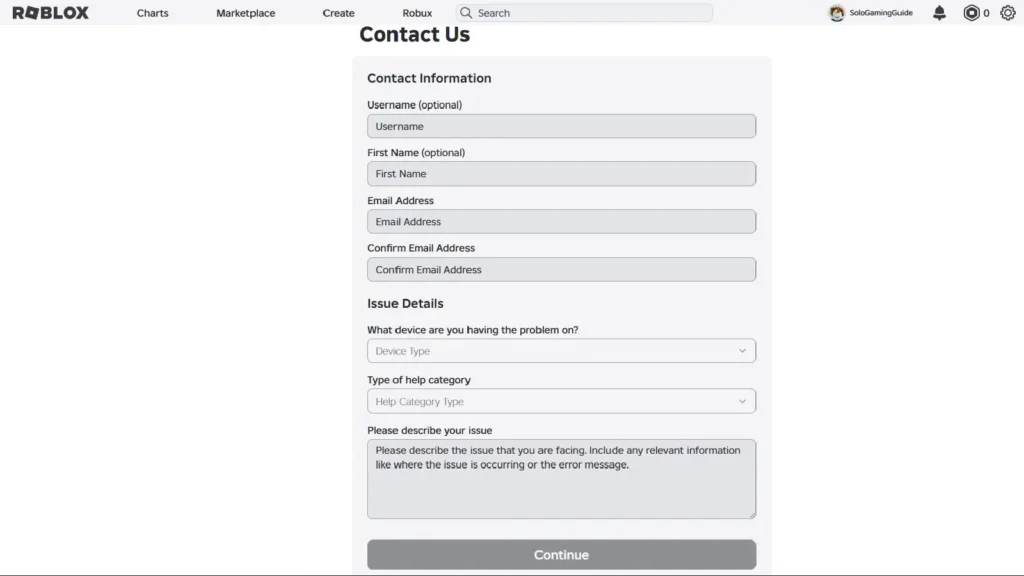
To submit a ticket:
- Go to roblox.com/support
- Log in to your Roblox account if possible — helps the team verify ownership faster
- Select your issue category (full breakdown below)
- Fill in all required fields with as much specific detail as possible
- Submit — Roblox sends a confirmation email with your ticket number. Save this email.
Every Roblox Support Category Explained
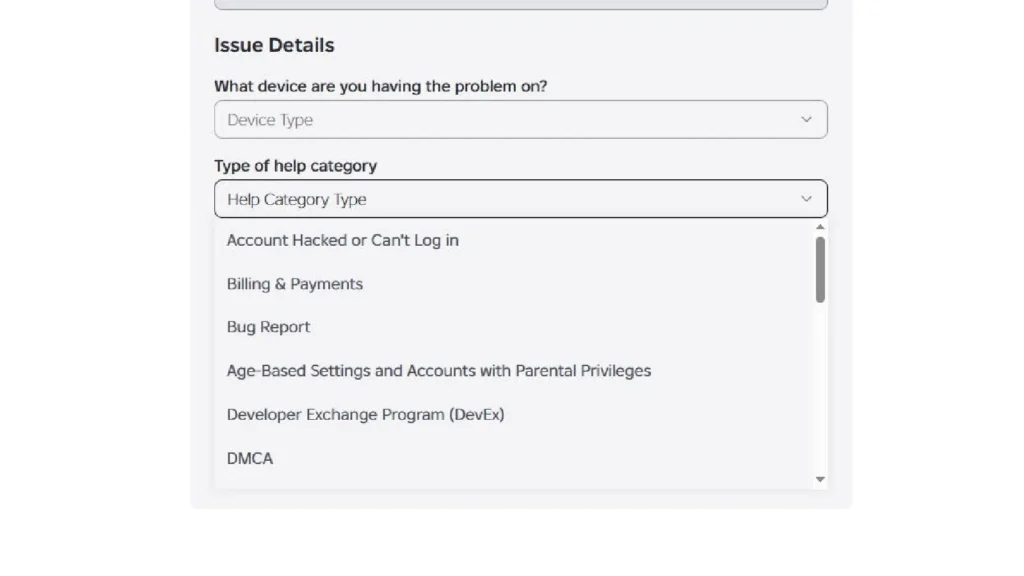
Choosing the wrong category routes your ticket to the wrong team and delays resolution. Here’s exactly what each category is for:
Account Issues
Login problems, forgotten username, 2-Step Verification lockout, account info updates. Not for hacked accounts — use Safety for that.
→ For the full account recovery process, see our Roblox login and account recovery guide.
Billing
Unauthorized Robux purchases, Premium subscription issues, duplicate charges, refund requests, payment method problems. Include the transaction date, amount, and payment method. Submit billing disputes as quickly as possible — refund eligibility may be time-limited.
Game Issues
Crashes, bugs, technical problems with a specific Roblox experience. Include the game name, PlaceID (the number in the game URL), your platform, device specs, and steps to reproduce.
Moderation
Appealing a ban or warning, disputing a chat filter action, appealing content removal. Reviewed by Roblox’s trust and safety team — not automatically reversed. Include the specific action, date, and a clear factual explanation.
Safety
Reporting abuse, harassment, predatory behavior, inappropriate content, or child safety concerns. Safety reports involving minors are prioritized. You do not need to be logged in to submit a safety report.
Roblox Studio / Developer Issues
Publishing errors, Studio crashes, asset upload problems, developer exchange issues. Routes to the developer support team — use this instead of General for any developer-related issue.
General
Anything that doesn’t fit above. This is the slowest route — general tickets are triaged before routing. Use a specific category whenever one fits.
How to Write a Roblox Support Ticket That Gets Resolved
Vague tickets get vague responses. Here’s exactly what to include per issue type:
Account recovery or 2SV lockout:
- Roblox username
- Email address on the account (even if you’ve lost access to it)
- Approximate account creation date
- Any Robux purchase history — transaction date and amount
- Device and platform originally used
- Any previous passwords you remember
Billing dispute or unauthorized purchase:
- Transaction ID (from your payment method history or Roblox billing page)
- Date, amount, and payment method
- What was purchased and why you’re disputing it
- Whether you recognize the device that made the purchase
Moderation appeal:
- Your Roblox username
- The specific action appealed — ban type, duration, or content removed
- Date the action was taken
- Your explanation — specific, calm, and factual. Emotional or threatening language does not help and can work against you.
Bug or game issue:
- Game name and PlaceID (number in the game URL: roblox.com/games/[PlaceID])
- Platform (Android, iOS, PC, console) and device model
- Exact description of what happened and how to reproduce it
- Screenshots or screen recording if available
In our experience reviewing common PH player support issues, the most frequent reason tickets are closed without resolution is missing information — especially missing account verification details. Include more than you think you need.
Roblox Support Response Times — What to Realistically Expect
| Ticket Type | Typical Response Time |
|---|---|
| Billing disputes | 2–5 business days |
| Account Issues (login, 2SV) | 3–5 business days |
| Safety reports (minors involved) | Prioritized — typically faster |
| Moderation appeals | 3–7 business days |
| Game / bug issues | 3–7 business days |
| General | 5–10 business days |
Typical ranges — not guarantees. High-traffic periods (major updates, school holidays) can extend these. — May 2026
Roblox Premium does NOT give faster support. Premium provides Robux and game perks — it has no effect on support ticket priority.
How to Follow Up on a Roblox Support Ticket (Without Losing Your Place)
This is the most important section — and the most commonly misunderstood by PH players.
Do NOT submit a new ticket for the same issue.
A new submission goes to the back of the queue. Your original ticket may be closed as a duplicate. This is the single most common mistake that turns a 3-day resolution into a 2-week one.
The correct way to follow up:
- Find the confirmation email Roblox sent when you submitted — it has your ticket number
- Reply directly to that email with your follow-up or additional information
- Your reply is added to the existing ticket thread — the right team sees it
If your ticket was closed and you disagree:
- Do not reply “I disagree” to the closure — that typically doesn’t reopen a case
- Submit a new ticket, reference your original ticket number in the description, and explain clearly why you’re requesting a second review
- Include any new information or evidence not in the original submission
There is no official escalation to a supervisor. Roblox support has no public escalation chain. Polite, detailed, factual tickets — and proper follow-up through ticket replies — are the only path available.
What Roblox Support Cannot Do
Know these limits before submitting to avoid weeks of waiting for something that won’t happen:
- Cannot restore spent Robux — purchases are final per Roblox’s Terms of Service
- Cannot recover items lost in voluntary player-to-player trades — accepted trades are final
- Cannot restore accounts deleted by the owner — account deletion is permanent
- Cannot provide real-time ticket status updates — no status tracker exists
- Cannot assign a specific agent to your case — tickets are handled by whoever picks them up
- Cannot guarantee ban reversal — moderation decisions are reviewed, not automatically overturned
- Cannot act on vague reports — reports need specific details: game names, usernames, PlaceIDs, dates
Parent and Guardian Tickets
If your child has a Roblox account (under-13) and you need support:
- Submit from the parent email registered to the child’s account — this establishes parental authority fastest
- You can request: account ownership changes, parental controls adjustments, content review, and account recovery
- For child safety concerns: use the Safety category — these are prioritized
- If the registered parent email is also lost: submit anyway, explain the situation clearly, and provide as much identity verification as possible
Frequently Asked Questions
Does Roblox have a phone number or live chat?
No. roblox.com/support is the only official channel. Any site listing a Roblox phone number is not legitimate.
How long does Roblox Support take to respond?
Typically 2–7 business days. Billing is faster (2–5 days). Moderation and general tickets take longer. Do not submit a second ticket while waiting.
Can I get a refund for Robux I accidentally spent?
Sometimes — Roblox may process a one-time courtesy refund for accidental purchases. Submit a Billing ticket immediately with the transaction details. No guarantee, and repeated requests are typically declined.
What happens if I submit duplicate tickets?
Your new ticket goes to the back of the queue and the original may be closed. Always follow up by replying to your original confirmation email.
Can I appeal a permanent ban?
Yes — use the Moderation category. Permanent bans can be reviewed but rarely reversed without a clear error. Include your username, ban date, and a factual explanation.
Can I contact Roblox Support in Tagalog?
Yes, but all responses come in English. Writing in English is recommended for fastest and most accurate routing.
