Quick Summary: Java Edition uses mods (.jar files via Forge or Fabric). Bedrock/PE uses Add-Ons (.mcpack/.mcaddon). They are completely different systems — a Java mod will not work on Bedrock. This guide covers both, including how to install gun mods and zombie apocalypse modpacks on each version.
Key Takeaways
- Java mods require Forge or Fabric mod loader — install the loader first, then drop mods in the
/modsfolder - Bedrock/PE uses Add-Ons, not mods — download .mcpack or .mcaddon files from MCPEDL
- Mods and Add-Ons are NOT cross-compatible — Java mods don’t work on Bedrock, ever
- Best Java mod sources: CurseForge and Modrinth
- Best Bedrock add-on source: MCPEDL.com
- Gun mods and zombie modpacks exist for both versions — covered below
Mods vs Add-Ons — The Confusion Most Guides Don’t Explain
Installing Minecraft mods on Java Edition requires a mod loader — but if you’re on Bedrock/PE (mobile or console), you’re not using mods at all. You’re using Add-Ons. These are completely different systems, and most guides only cover one. Here’s the clear breakdown:
| Java Edition | Bedrock / PE | |
|---|---|---|
| What they’re called | Mods | Add-Ons |
| File format | .jar | .mcpack / .mcaddon |
| How to install | Forge or Fabric loader | Tap file → auto-imports |
| Where to get them | CurseForge, Modrinth | MCPEDL, Marketplace |
| Cross-compatible? | ❌ No | ❌ No |
If you’re on mobile or console, skip to the Add-Ons section. If you’re on PC with the Java launcher, the mod loader section is for you. Also worth noting: the recent Minecraft Bedrock 26.10 update changed some behavior pack compatibility — check that link if your add-ons stopped working after updating.
Java Edition — Forge vs Fabric (Which Do You Need?)
Before installing any Java mod, you need a mod loader — the bridge between Minecraft and your mods.
Forge
- The original and most widely supported loader
- Required for most popular modpacks (RLCraft, All the Mods, FTB series)
- Better for large modpacks with lots of content mods
- Slightly slower to update to new Minecraft versions
Fabric
- Lighter and faster than Forge
- Better for performance mods (Sodium, Iris, Lithium)
- Preferred for newer content mods and smaller setups
- Updates to new MC versions faster
Which should you pick? Check the mod you want first — it will specify Forge or Fabric. Most gun mods and large modpacks are Forge. Most performance mods are Fabric. You cannot mix loaders for the same mod.
How to Install Minecraft Mods on Java Edition (Step-by-Step)
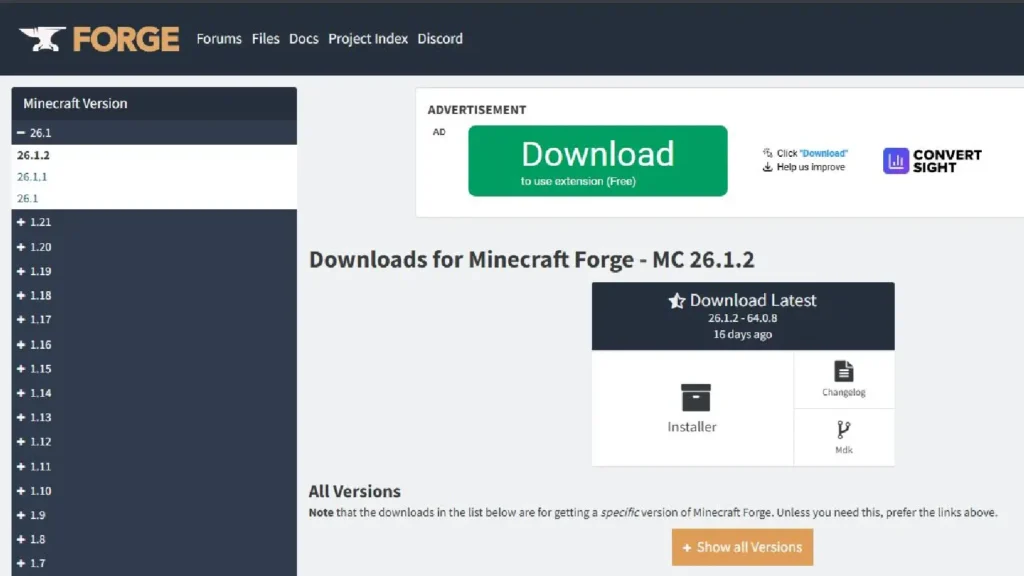
Step 1 — Install Your Mod Loader
For Forge:
- Go to files.minecraftforge.net — download the Installer for your Minecraft version
- Run the installer → select “Install client” → click OK
- Open the Minecraft Launcher — a new Forge profile appears in your version list
- Launch once using the Forge profile to generate the
/modsfolder
For Fabric:
- Go to fabricmc.net/use — download the Fabric Installer
- Run it → select your Minecraft version → click Install
- Open the Minecraft Launcher — select the Fabric profile
- Also install Fabric API from Modrinth — most Fabric mods need it
Step 2 — Download Your Mods
Only download from:
- CurseForge.com — largest mod library, verified uploads
- Modrinth.com — cleaner interface, growing library
Match the mod version to both your Minecraft version AND your loader. A 1.20 Forge mod will crash a 1.21 Fabric instance.
Step 3 — Drop Mods Into the /mods Folder
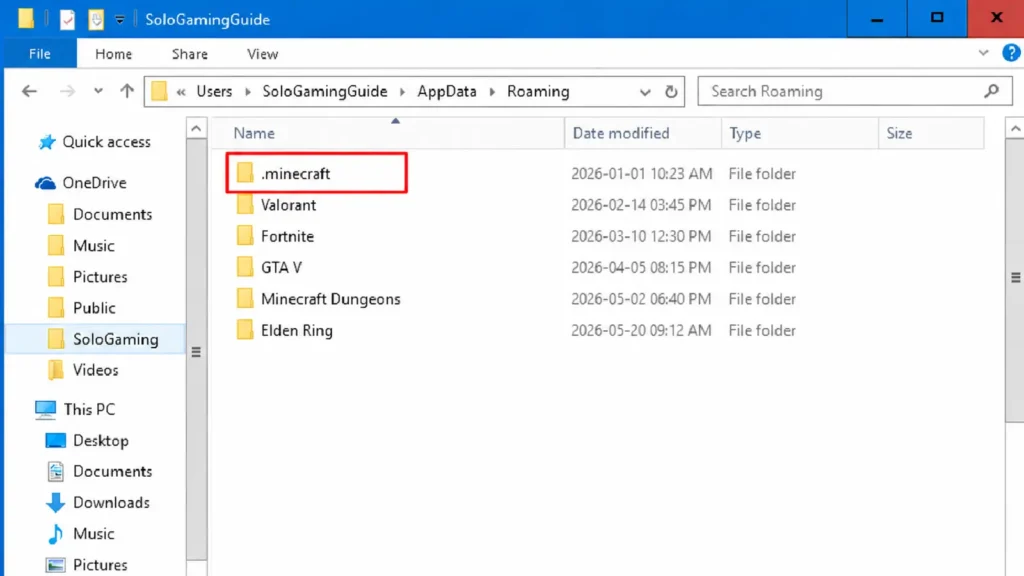
- Press Win + R → type
%appdata%\.minecraft→ Enter - Open the mods folder (create it if missing)
- Drag and drop your .jar files inside
- Launch Minecraft with your Forge/Fabric profile
In our testing, version mismatch is the single most common cause of mods failing to load — check every .jar matches the same MC version.
Best Minecraft Mods for Java: Gun Mod + Zombie Apocalypse
Gun Mod: Vic’s Modern Warfare
The most-downloaded Java gun mod currently. Adds realistic firearms with reload animations, scopes, and attachments. Requires Forge. Search “Vic’s Modern Warfare” on CurseForge and match your MC version.
Zombie Apocalypse: Apocalypse Reborn Modpack
Available on CurseForge as a full modpack — install via the CurseForge app which handles Forge and all mod dependencies automatically.
Install a modpack via CurseForge app:
- Download the CurseForge app from curseforge.com
- Browse Modpacks → search “Apocalypse Reborn” → click Install
- Launch from within the CurseForge app — no manual /mods setup needed
Bedrock/PE Edition — Add-Ons Explained
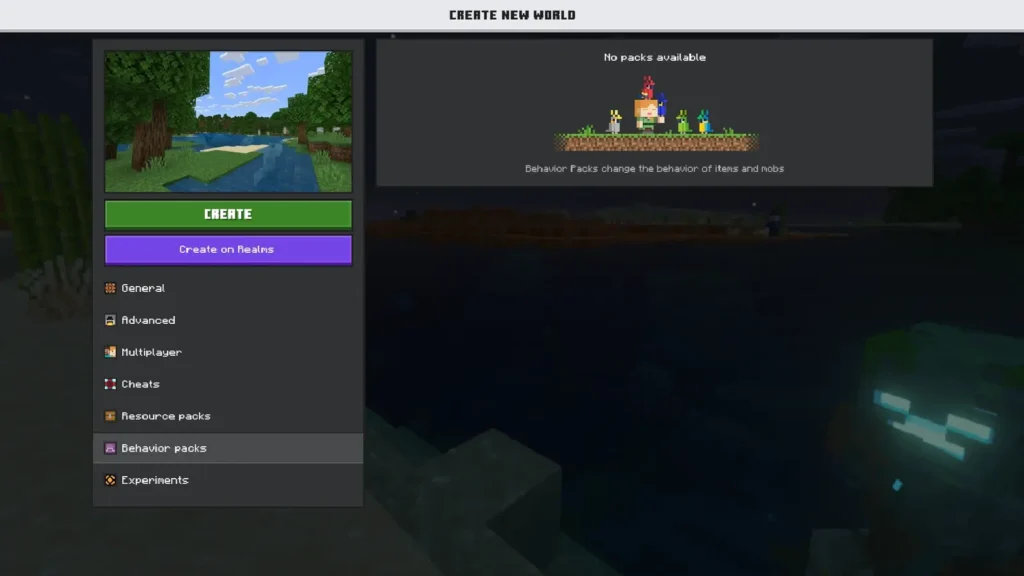
If you’re on Android, iOS, or console, you have Bedrock. Bedrock uses Add-Ons in two types:
- Behavior Packs — change game logic: mob AI, loot tables, new entities
- Resource Packs — change visuals: textures, sounds, models
Most add-ons are packaged as:
- .mcpack — a single pack
- .mcaddon — behavior + resource bundled together (most common)
No loader needed. Install is much simpler than Java.
How to Install Minecraft PE Mods and Add-Ons (Step-by-Step)
Mobile (Android)
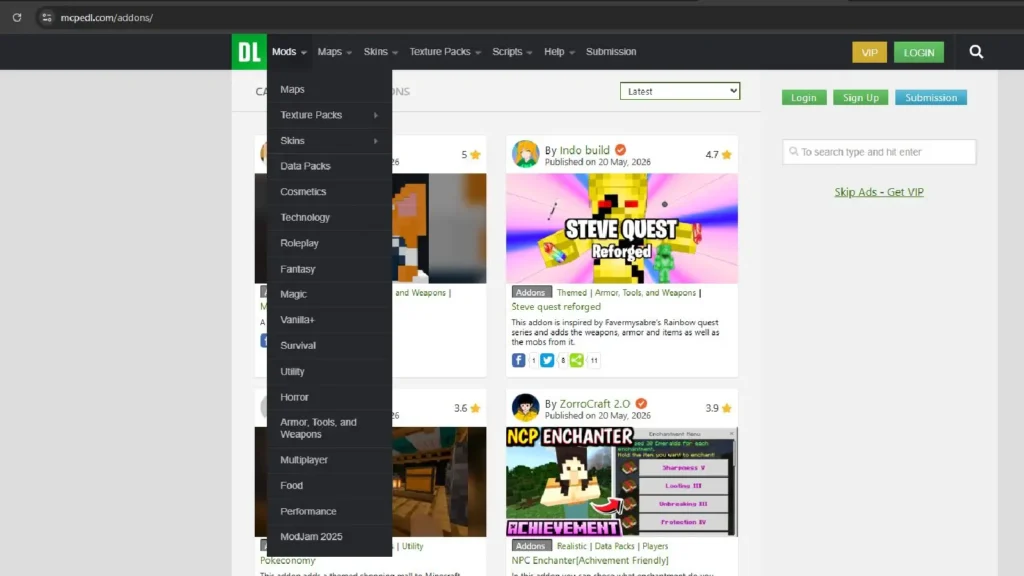
- Go to MCPEDL.com → search your add-on → tap Download
- Tap the downloaded .mcaddon file in your Downloads folder
- Minecraft opens and imports automatically — “Successfully imported” message appears
- Open Minecraft → Create/Edit World → Behavior Packs tab → activate the pack
- Apply and launch your world
After testing on multiple Android devices, we found that Minecraft sometimes doesn’t open automatically when tapping the file. Fix: open Minecraft manually → Settings → Storage → Import → browse to your Downloads folder and select the file.
Mobile (iOS)
- Download the .mcaddon from MCPEDL
- Tap Share → Copy to Minecraft
- Minecraft imports and opens → activate in world settings as above
PC (Windows 10/11 Bedrock)
- Download the .mcaddon from MCPEDL
- Double-click the file — Minecraft auto-imports
- Activate in your world settings
Best Minecraft PE Add-Ons: Gun + Zombie Apocalypse
Gun Add-On: Modern Weapons Add-On
Search “Modern Weapons” on MCPEDL — sort by Most Downloaded for the most stable version. Adds functional guns with custom sounds and 3D models. Install as .mcaddon.
Zombie Apocalypse Add-On
Search “Zombie Apocalypse” on MCPEDL — filter by Most Downloaded, check comments for compatibility notes. The top-rated version adds custom zombie variants, infected villages, and survival mechanics.
Pro tip from gameplay testing: activate the Zombie Apocalypse behavior pack on a fresh world, not an existing one — mob spawner changes can cause issues in pre-generated terrain.
Common Errors and Fixes
Java: Game crashes after adding mods
Almost always a version mismatch. Every .jar in your mods folder must match your MC version and loader. Remove mods one by one to isolate the conflict.
Java: “This mod requires [mod name]”
A dependency is missing. The mod name is in the error. Download it from CurseForge or Modrinth and add to /mods.
Bedrock: “Successfully imported” but pack not visible
Restart Minecraft. Still missing: Settings → Storage → confirm it’s listed → manually activate in world settings.
Bedrock: Add-on active but nothing changed
Check you activated the correct pack type — Behavior Pack for gameplay changes, Resource Pack for visuals. Some add-ons need both active.
Bedrock: Game crashes after activating add-on
Version incompatibility. Check the MCPEDL page for supported versions. Deactivate and look for a newer build.
Frequently Asked Questions
Can I use Java mods on Minecraft PE (Bedrock)?
No. Java mods (.jar) are completely incompatible with Bedrock. Bedrock uses Add-Ons (.mcpack/.mcaddon). No workaround exists — it’s a fundamental platform difference.
Is MCPEDL safe?
MCPEDL is the most trusted Bedrock add-on site. Stick to add-ons with high download counts and recent positive comments. Avoid unknown creators with no comments.
Do mods work on Minecraft Realms?
Java Realms: limited mod support. Bedrock Realms: Add-Ons supported if the Realm owner activates them.
Will mods get me banned?
Mojang does not ban for mods in single-player or private servers. Public servers vary — check server rules.
Can I run multiple add-ons at once on Bedrock?
Yes, but conflicts happen if two add-ons modify the same behavior. Test one at a time when troubleshooting.
