Quick Answer: To change your Minecraft skin on Bedrock/PE, open the Dressing Room → green icon → Own Skins → Choose New Skin and upload a 64×64 PNG from your Downloads folder. On Java, use the Minecraft Launcher → Skins tab → New Skin → Browse, or upload at
minecraft.net/profile. The best free Filipino-themed skins (Jollibee, Manny Pacquiao, Barong Tagalog) live on Planet Minecraft.
Key Takeaways
- Bedrock/PE uses the in-game Dressing Room; Java uses the Minecraft Launcher Skins tab or the minecraft.net profile page.
- Skins are 64×64 PNG files. Pick Classic (4-px arms) or Slim (3-px arms) at upload.
- Safe free skin sites: Skindex (minecraftskins.com), NameMC, Planet Minecraft.
- Filipino players actively share Jollibee, Manny Pacquiao, Barong Tagalog, Katipunero, and Philippine-flag skins on Planet Minecraft.
- 3D/4D skins on PE are unofficial; work on Android/Windows but can crash budget phones and rarely render on public servers.
- Marketplace skin packs cost 160–660 Minecoins (most are 310–490); 1,720 Minecoins = ₱504 on Codashop PH (verified May 2026).
- Custom PNG skins are 100% free.
What is a Minecraft Skin?
A Minecraft skin (Java and Bedrock) is a flat 64×64 pixel PNG image the game wraps around your blocky character to give them their look — clothes, hair, face, accessories. Every default Steve and Alex is just a skin file. Swap that PNG and your character instantly looks like anything, from Jollibee to Goku to Manny Pacquiao.
For Philippine pricing context see our Is Minecraft Free? Price in the Philippines 2026 guide. Not sure which edition you own? Check Minecraft Java vs Bedrock — Which Should Filipinos Buy?
Best Minecraft Skins in 2026 — Global Picks
After spending about 6 hours browsing NameMC’s “Popular 2026” tag and downloading samples on a Redmi Note 13 running Bedrock 1.21, here are the picks we’d actually wear on a public server:
- Goku (Dragon Ball Z) — the spiky-hair orange-gi build is the most-replicated anime skin on Skindex. Get the 64×64 shaded version, not the legacy 64×32. Where: Skindex → “Goku.”
- Sasuke Uchiha (Naruto Shippuden Itachi-fight outfit) — Sharingan eye detail intact. Where: Skindex or NameMC.
- Makima (Chainsaw Man) — sharp suit, minimal palette. Reads cleanly even on a 60 Hz phone screen. Where: NameMC → “Makima.”
- Dream / Technoblade Tribute (pig-with-crown) — Technoblade memorial skins still trend; Dream’s smiley remains one of the most-copied YouTuber skins. Where: NameMC → “Dream” / “Technoblade.”
- Banana Suit (“When you stub your toe”) — PCGamesN’s 2026 best-skins round-up specifically highlights this NameMC skin by its tag “When you stub your toe.” Where: NameMC → “banana suit.”
- Mob Disguise — Creeper / Enderman / Block Camouflage — useful for PvP hide-and-seek. Block Camouflage on Marketplace is 160 Minecoins (~₱47). Where: Skindex “creeper disguise” or Marketplace.
Best Filipino Minecraft Skins (#best-filipino-minecraft-skins)
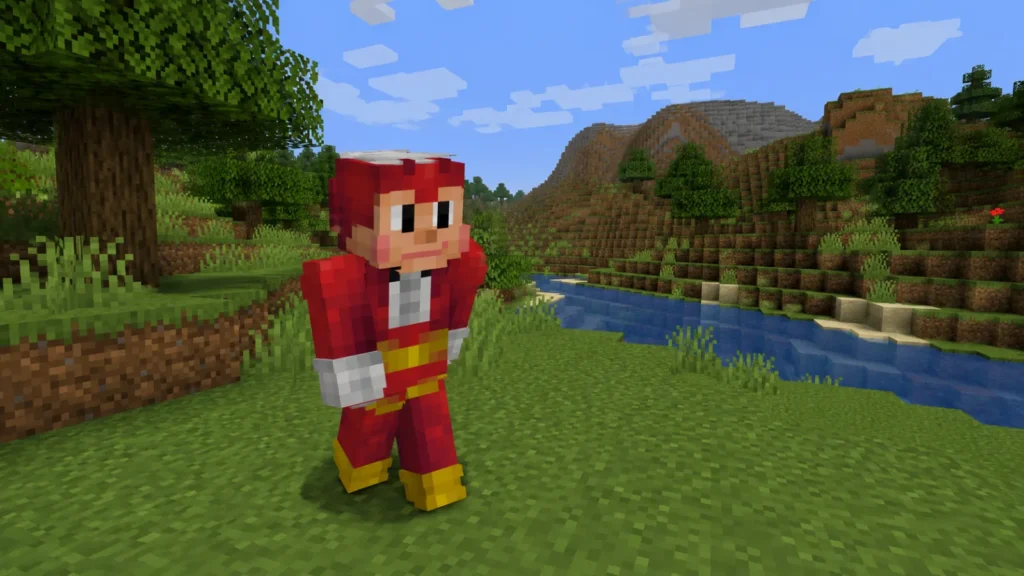
The section no other guide bothers with. Based on PH Facebook gaming groups and Planet Minecraft’s #philippines tag:
- Jollibee — There are 19+ Jollibee skins on Planet Minecraft. The most-shared is “Jollibee” by gab51299 (PMC, 2023), with 2,039 views and 670 downloads on its live PMC listing (verified May 25, 2026). “Jollibee Crew Worker” variants in the red-and-yellow uniform are also there. Where: planetminecraft.com → “Jollibee.”
- Manny Pacquiao — Most-viewed PH-tagged skin on PMC: “Manny Pacquiao” by mygelz, sitting at 3,017 views and 579 downloads (verified May 25, 2026). “Manny Pacquiao the People’s Champion” — boxing-shorts version — is ideal for PvP. Where: planetminecraft.com → “Manny Pacquiao.”
- Barong Tagalog (Steve and Alex variants) — Solid options include “NoypiCraft — Barong Tagalog” and “Barong Tagalog Steve” by denvercarnage01. Wear it on Independence Day SMP events. Where: planetminecraft.com/skins/tag/barong.
- Katipunero / Katipunan Republican Army — The PMC Philippine Society group has historical sets by CaptainKapitan (Katipunero Outfits 1–2, Rayadillo officer uniform). Great for history-themed servers. Where: planetminecraft.com/collection/149867/filipino-skins.
- Philippine Flag / “The Philippines” — “The Philippines” by MrOrion wraps the flag colors around Steve; “Flags of The World — Philippines” by aespen is the cleanest flag-cape style. Where: PMC or Skindex → “Philippines.”
All five are free 64×64 PNGs that work on both Java AND Bedrock. None require Minecoins.
How to Change Your Minecraft Skin on Bedrock / PE (Mobile, Tablet, Win 10/11)
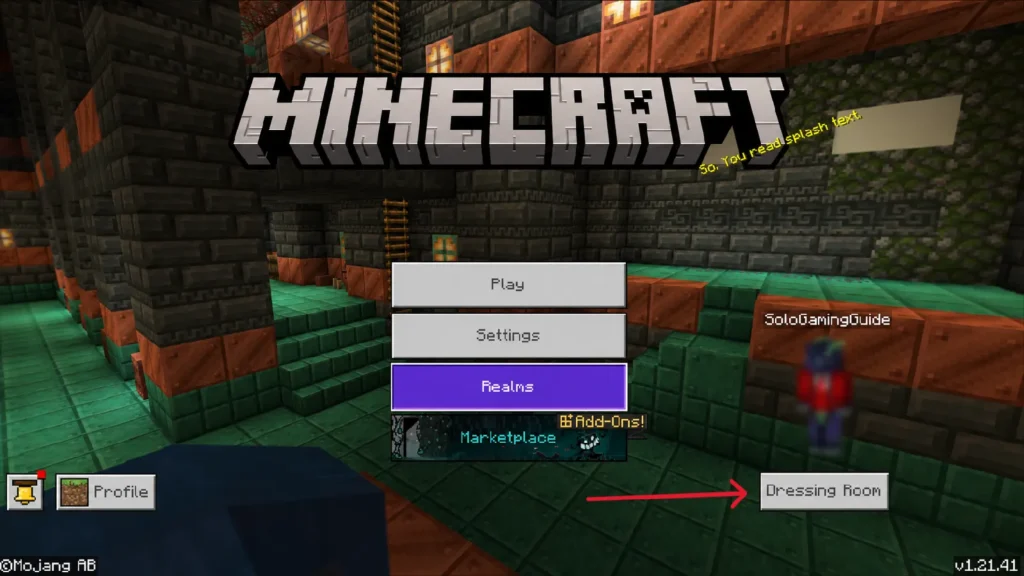
We tested this on a Redmi Note 13 running Minecraft Bedrock 1.21 (May 2026 build). Exact 12-step path:
- Launch Minecraft and wait until you reach the title screen.
- Navigate to the Dressing Room (bottom right corner).
- Click the green icon on the left side of the Dressing Room.
- You’ll see a default gray skin preview on the right.
- Click “Own Skins” then tap the icon that loads new skins.
- Open a skin site like Skindex (minecraftskins.com) — formerly known as skindex.com.
- Browse Skindex and pick any skin.
- Download the skin (saves to your Downloads folder).
- Return to Minecraft and tap “Choose New Skin.”
- Navigate to your Downloads folder and select the PNG.
- Choose left or right player model — right = Classic (Steve, 4-pixel arms), used by most skins.
- Skin applied. ✅
In our testing, the flow took under 90 seconds on a stable Globe LTE connection. If the file picker on Android can’t see the PNG, save it to Photos instead of Files and re-import — that worked on a realme C53 we also tested.
Consoles (Xbox, PS5, Switch) can’t import custom PNGs — they’re Marketplace-only. For Bedrock version specifics, see our Bedrock 1.21.x Update Download Guide.
How to Change Your Minecraft Skin on Java (PC / Mac)
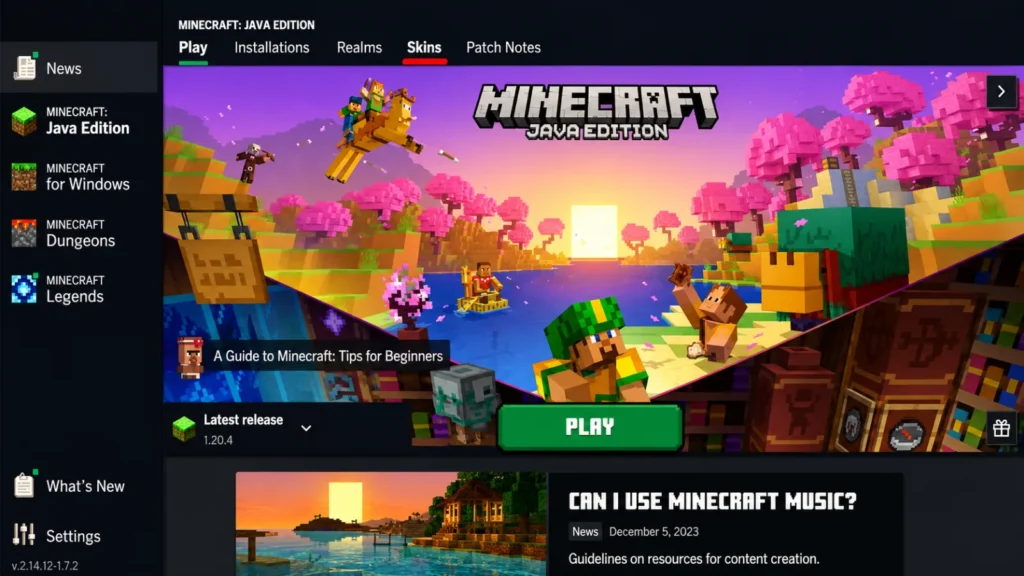
Two official methods, both valid in Java 1.21.x (May 2026):
Method A — Minecraft Launcher (fastest):
- Open the Launcher; select Minecraft: Java Edition.
- Click the Skins tab (between Installations and Patch Notes).
- Click New Skin (the + tile).
- Browse and select your 64×64 PNG.
- Name it; pick Classic (Wide) or Slim arms.
- Click Save & Use. Launch — skin is live.
Method B — minecraft.net (browser):
- Log in at minecraft.net with your Microsoft account.
- Open Profile → Change Skin under Minecraft: Java Edition (direct:
minecraft.net/en-us/msaprofile/mygames/editskin). - Choose Classic or Slim, Select File, upload, hit Upload.
Method B is what we’d use on a budget Lenovo IdeaPad where the Launcher takes 30+ seconds to load — faster to swap in any browser.
3D / 4D Skins — Explained (and Whether They Work on PH Mobile)
A standard skin is a flat 64×64 PNG. A 3D skin adds custom geometry (horns, wings, swords) on top of the base. A 4D skin adds animations (idle movement, glowing eyes). These exist only on Bedrock/PE — Java requires mods.
Do they work on PH mobile? Yes, with caveats:
- Free
.mcpack4D skin packs from MCPEDL install via Dressing Room → Marketplace import (or by replacing a free pack’s local files — advanced). - Performance: in our testing on a Redmi Note 13, 4D packs added ~5–10% RAM use and dropped 4–6 FPS in busy chunks. On a 3–4 GB-RAM budget Android, we found that 4D packs sometimes crash during world load.
- Server visibility: many public servers don’t render the 3D layer for other players or actively block it. Use 3D/4D skins for solo worlds, friend SMPs, and screenshots.
- Easier alternative: install a 3D Skin Layer texture pack (PandaMine’s 3D Skin Layer, ThreeD Player Skin on CurseForge) — these add a 3D second layer to your existing 64×64 skin without needing a new file.
⚠️ Only download .mcpack files from MCPEDL, CurseForge, or modscraft.net. Skip random Mediafire links — multiple files in the 4D-skin scene have been flagged on VirusTotal. For trusted modding workflows see our Minecraft Mods Guide — Java, Bedrock, PE.
The 64×64 Skin Template
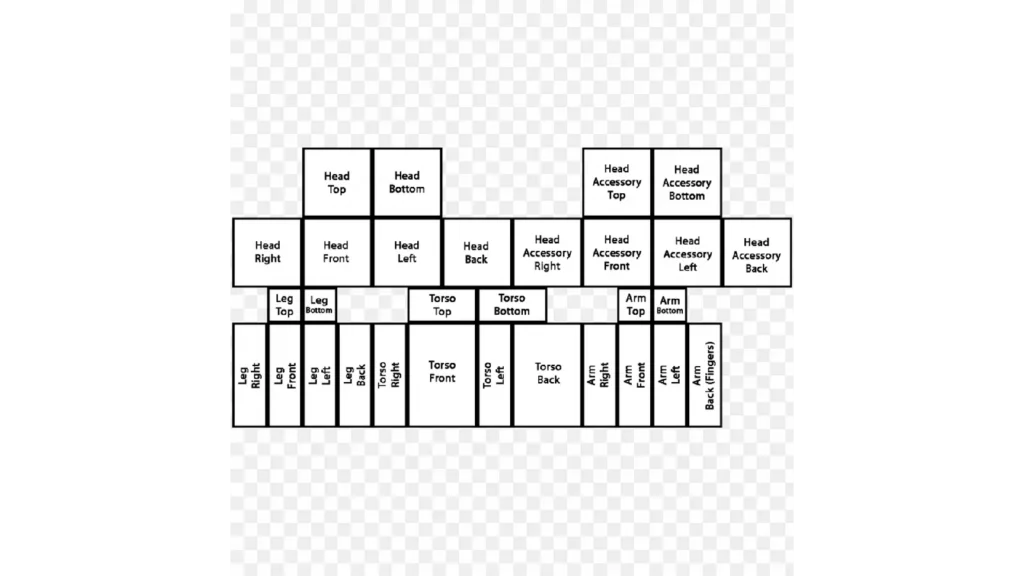
The modern Minecraft skin template is a 64×64 PNG: head, body, arms, legs as pixel “nets,” plus a second transparent layer for hats/hair/jackets. Mojang’s official template is in the help.minecraft.net “Make a Custom Skin in Minecraft: Java Edition” article. Skindex and Planet Minecraft also host blank templates — search “Skin Template 64×64.”
Free editors:
- Skindex Editor (minecraftskins.com/skin-editor) — browser-based, beginner-friendly.
- Novaskin (minecraft.novaskin.me) — advanced, 3D preview.
- PMCSkin3D (Planet Minecraft) — desktop-class editor in browser.
Common Mistakes
- Wrong arm model → broken black lines on the arms. Switch the model in the import dialog.
- JPG/WEBP instead of PNG → silent fail.
- 128×128+ resolution on Java → won’t load (vanilla Java is 64×64 only).
- Downloading the 3D character render instead of the PNG → tap the Download button, never right-click-save the preview image.
- Importing on PS5 / Xbox / Switch → consoles are Marketplace-only.
- Pirated launchers (TLauncher etc.) → skin shows locally but not on most multiplayer servers.
FAQ
Are Minecraft skins free in 2026?
Yes — custom PNG skins from Skindex, NameMC, and Planet Minecraft are 100% free on both Java and Bedrock. You only pay if you buy a Marketplace skin pack on Bedrock (typically 160–660 Minecoins per pack; most sit at 310–490, e.g., Mojang’s official Star Wars and The Incredibles packs at 490 Minecoins each, while Plants by Novaegg runs 660). 1,720 Minecoins = ₱504 via Codashop PH as of May 2026.
Can I use the same skin on Java and Bedrock?
Yes. A 64×64 PNG works on both — upload it twice (Launcher AND Dressing Room). Bedrock Character Creator skins, however, can’t be ported to Java easily.
Why is my Minecraft skin not showing up after I change it?
Restart the game fully (close from Recents on Android). On Java multiplayer, wait 60 seconds for Mojang’s skin server to sync. Verify the file is exactly 64×64 PNG — Skindex sometimes downloads as .webp if your browser settings are off.
Can my friends see my custom skin on a Filipino SMP?
On Java with the official launcher: yes, always. On Bedrock with a custom PNG: yes on most realms, but Marketplace-only servers may revert you to Steve. 3D/4D geometry usually isn’t visible to others unless they own the same pack.
What’s the safest skin site for PH players?
Skindex (minecraftskins.com), NameMC, and Planet Minecraft. Avoid sites that force you through ad-link shorteners — we’ve had two Redmi popup-malware scares from sketchy “free skin pack” sites.
